Training guide
How Let's poker Works
A practical guide to friend rooms, AI heads-up practice, hand records, and training reports on Let's poker.
Product steps were checked against the current lobby, room, replay, and report flows.
Overview
Let's poker is a practice-only Texas Hold'em training platform. It helps players create private practice tables, rehearse heads-up decisions against an AI opponent, and review completed hands without assigning cash value to chips, rankings, reports, or virtual items.
The product is built around repeatable learning sessions. A player can set up a room, invite friends with a room code, play simulated hands, and use the recorded action history to discuss decisions after the hand ends.
Friend Practice Rooms
Friend rooms are private practice tables. The host creates a room, shares the room code, and invited players can sit at available seats. The table tracks seats, stacks, blinds, turn order, community cards, public actions, showdowns, chat context, and room records for training review.
These rooms are designed for study groups, friendly practice, coaching conversations, and hand-reading drills. Room names, chat, voice, profiles, and reports may not be used to arrange real-money games, side payments, chip sales, staking, swaps, prize pools, or offline settlement.
Heads-Up AI Practice
AI practice creates a focused heads-up table with one AI opponent. It is useful when you want to rehearse a specific decision pattern without waiting for another player. For example, you can practice preflop discipline, continuation-bet sizing, turn pressure, showdown review, or tempo control.
The AI opponent is a training aid. It does not provide gambling value, financial advice, guaranteed strategy, professional coaching, or real-world winnings. Treat each result as a prompt for review, not as proof of skill or value.
Hand Records and Reports
After a hand, Let's poker can preserve public action history, board cards, revealed hole cards, showdown details, winning hand type, chip movement, and timestamps. These records help players answer practical training questions:
- Did my action match the plan I had before the street began?
- Did the board texture change the strength of my range?
- Did my bet size create the pressure or information I expected?
- Which parts of the hand should I review before the next session?
Reports may also help moderators investigate abuse, harassment, illegal content, gambling misuse, or attempts to arrange offline settlement.
Practice-Only Boundaries
Practice chips, virtual items, hand reports, rankings, room outcomes, and AI results are not money, property, debt, credit, stored value, prizes, or gambling tokens. They cannot be redeemed, transferred, sold, gifted, exchanged, loaned, staked, or settled offline.
If a room, chat, profile, or external link appears to arrange gambling or settlement, Let's poker may remove content, end rooms, restrict features, suspend accounts, preserve records, or take other safety action.
Suggested Training Session
Start with one clear goal. For example, spend fifteen minutes on heads-up AI practice and review only preflop choices, or create a friend room and discuss three turn decisions after each showdown. Short focused sessions are easier to learn from than long sessions with no review target.
Before ending a session, review at least one hand record and write down one decision you would repeat and one decision you would change. That review loop is the core value of Let's poker.
Product Walkthrough
From the home screen, choose AI practice for an immediate heads-up table or open the lobby to create a friend room. A friend-room host selects the practice settings and shares the room code. Once seated, the table shows the current pot, community cards, active player, legal actions, and practice stacks. After a hand ends, use the hand record or report instead of relying on memory.
On a narrow mobile screen, keep the table as the primary surface. Account, language, connection status, and room tools are available as compact controls so they do not cover seats or cards. If a control overlaps the action area, report the device, browser, screenshot, and room state to support.
A Verifiable First Session
- Start one AI hand and identify the button and blind before acting.
- Say the amount to call and effective stack out loud.
- Use one bet shortcut, then verify the final amount before submission.
- Finish the hand and open its action record.
- Recalculate the pot street by street and compare it with the record.
Common Mistakes
Common first-session mistakes include treating a shortcut as strategy advice, judging a choice only by whether the pot was won, and starting a new hand before reviewing the first uncertain decision.
Product Reference
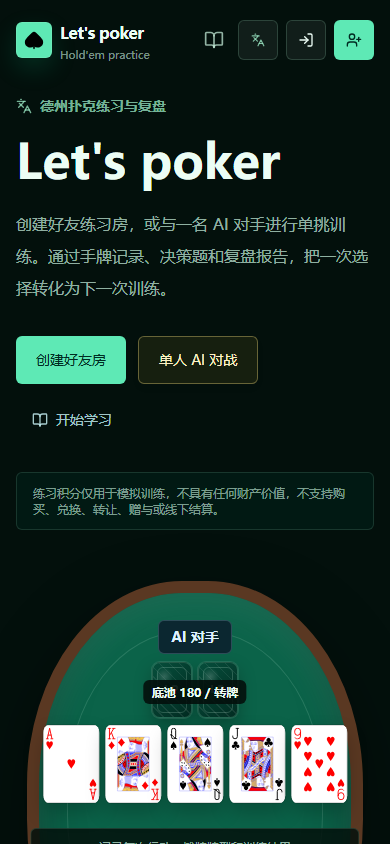
The live mobile entry screen keeps the three main practice routes visible before the table preview.